Celery + Supervisor without the mystery
A restaurant kitchen for your background jobs — restart order, Beat gotchas, and Supervisor layouts that don’t surprise you.
English
The page that froze
Say you have a small Django app. Nothing fancy. It sends a welcome email, imports a PDF someone uploads, and refreshes some prices every few minutes.
The first version does all of that inside the web request. A user clicks "Import", the PDF takes 40 seconds to parse, and the browser spinner just... spins. Other users are waiting too, because the web process is busy. Eventually something times out and everyone is sad.
The fix is an old idea: don't do slow work while someone is waiting. Write it down and do it later.
- Celery is the "do it later" system. The web app writes a small note ("import PDF #42") into a queue, answers the user right away, and someone else does the work.
- Supervisor is the babysitter. It starts your web app, your Celery worker and your scheduler, and if one of them crashes, or the server reboots at 3 AM, it brings them back without you waking up.
A queue is just a waiting line for jobs. A broker is the program that holds that line, usually Redis or RabbitMQ.
The three roles
Think of a small restaurant.
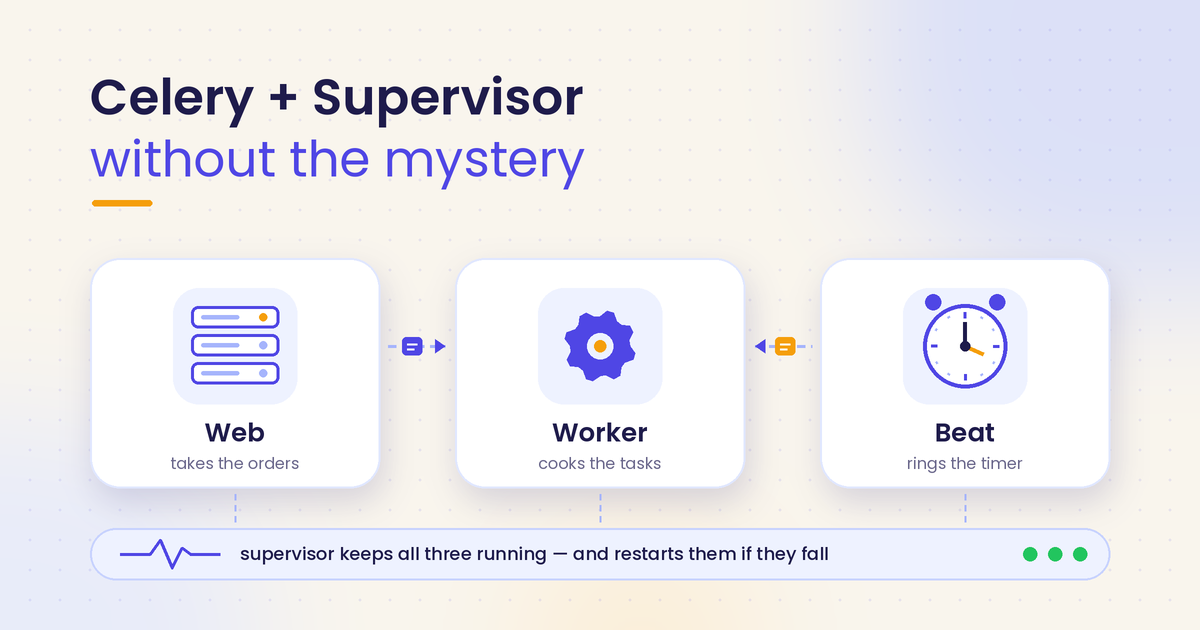
- Web is the waiter. It answers HTTP requests, takes the order, and says "coming right up". It should never go into the kitchen and cook.
- Worker is the cook. It pulls jobs off the queue and runs them, one after another or a few at a time.
- Beat is the alarm clock on the wall. Every 5 minutes it shouts "refresh prices!" by putting a job on the queue. Beat doesn't do the job. It only rings.
The one rule to tattoo somewhere: run exactly one Beat. Two alarm clocks means every scheduled job happens twice. Two "send the daily report" emails. Two invoice runs. Your users will notice before you do.
A clean layout under Supervisor
Supervisor reads small config files, usually from /etc/supervisor/conf.d/. Each [program:...] block is one process it looks after. Let's use a made-up app at /home/app/myapp, a virtualenv at /home/app/myapp/.venv, and a normal Linux user called app.
Option A: three separate programs
; /etc/supervisor/conf.d/myapp.conf

[program:myapp-web]
command=/home/app/myapp/.venv/bin/gunicorn myapp.wsgi:application
    --bind unix:/home/app/myapp/run/gunicorn.sock --workers 3
directory=/home/app/myapp
user=app
environment=DJANGO_SETTINGS_MODULE="myapp.settings.prod",HOME="/home/app",PATH="/home/app/myapp/.venv/bin:/usr/bin:/bin"
autostart=true
autorestart=true
stopwaitsecs=30
stopasgroup=true
killasgroup=true
redirect_stderr=true
stdout_logfile=/var/log/myapp/web.log
stdout_logfile_maxbytes=20MB
stdout_logfile_backups=5

[program:myapp-celery]
command=/home/app/myapp/.venv/bin/celery -A myapp worker
    --loglevel=INFO --concurrency=2 --max-tasks-per-child=200
directory=/home/app/myapp
user=app
environment=DJANGO_SETTINGS_MODULE="myapp.settings.prod",HOME="/home/app",PATH="/home/app/myapp/.venv/bin:/usr/bin:/bin"
autostart=true
autorestart=true
startsecs=10
stopwaitsecs=600
stopasgroup=true
killasgroup=true
priority=998
redirect_stderr=true
stdout_logfile=/var/log/myapp/celery.log
stdout_logfile_maxbytes=20MB
stdout_logfile_backups=5

[program:myapp-celerybeat]
command=/home/app/myapp/.venv/bin/celery -A myapp beat --loglevel=INFO
    --schedule=/home/app/myapp/run/celerybeat-schedule --pidfile=
directory=/home/app/myapp
user=app
environment=DJANGO_SETTINGS_MODULE="myapp.settings.prod",HOME="/home/app",PATH="/home/app/myapp/.venv/bin:/usr/bin:/bin"
autostart=true
autorestart=true
startsecs=10
stopwaitsecs=30
stopasgroup=true
killasgroup=true
priority=999
redirect_stderr=true
stdout_logfile=/var/log/myapp/celerybeat.log
stdout_logfile_maxbytes=20MB
stdout_logfile_backups=5
(Supervisor allows a long command= to continue on indented lines. If your version complains, just put it on one line.)
A few lines worth a second look:
user=app: Supervisor itself runs as root, but your code shouldn't. This line drops to theappuser.environment=: Supervisor does not load the user's shell profile. No.bashrc, nosource .venv/bin/activate. If a variable matters, set it here (or load it in your settings from a.envfile).stopwaitsecs: how long Supervisor waits after asking politely before it pulls the plug. More on this below. It's the most common silent bug.stopasgroup/killasgroup: send the stop signal to the whole family (the main process plus its children). Without it, a Celery or Gunicorn child can be left behind as an orphan.priority: lower numbers start first and stop last.
Option B: a group
Same three [program:...] blocks, plus one more:
[group:myapp]
programs=myapp-web,myapp-celery,myapp-celerybeat
Now you can talk to all of them at once:
sudo supervisorctl status myapp:*
sudo supervisorctl restart myapp:*
sudo supervisorctl restart myapp:myapp-celery
My pick: Option B. You still control each process alone, but "restart the whole app" becomes one command, and when a second app moves onto the same server, the names don't get mixed up. Option A is fine for a single toy project. B is what you'll be glad you did six months later.
Restart order that avoids half-dead jobs
Restarting isn't just "turn it off and on again". The order decides whether jobs finish, fail, or run twice.
Config changed vs code changed. If you edited a file in conf.d/, run:
sudo supervisorctl reread   # "what changed in the config files?"
sudo supervisorctl update   # apply it, restart only what changed
A plain restart does not read the new config. People edit stopwaitsecs, run restart, and wonder why nothing changed. If only your Python code changed, restart is the right tool.
Workers first, then Beat, then web. Why? Imagine your new code adds a task called send_receipt. If the web or Beat restarts first, it starts putting send_receipt jobs on the queue while the old worker is still running. The old worker has never heard of that task and logs Received unregistered task, and the job is dropped. Restart the cooks before you hand them a new menu.
The same goes the other way: if you change a task's arguments, jobs already sitting in the queue still carry the old arguments. Make new arguments optional for one release, then clean up.
A boring, reliable deploy, run on the server itself:
cd /home/app/myapp
git pull --ff-only
.venv/bin/pip install -r requirements.txt
.venv/bin/python manage.py migrate --noinput
.venv/bin/python manage.py collectstatic --noinput
sudo supervisorctl restart myapp:myapp-celery
sudo supervisorctl restart myapp:myapp-celerybeat
sudo supervisorctl restart myapp:myapp-web
sudo nginx -t && sudo systemctl reload nginx   # only if you touched nginx config
The "why did it run twice?" gotcha. When a worker picks up a job, it eventually tells the broker "got it, you can delete that". That message is called an ack (acknowledgement).
- By default Celery acks right before running the task. If the worker is killed mid-task, the job is gone. Lost, not repeated.
- With
acks_late=True, it acks after the task finishes. Safer, because a killed worker means the job comes back. But that also means the job can run twice: once half-way, once fully. - On Redis, unacked jobs come back after the visibility timeout (default: one hour). Here's the sneaky part: a task scheduled with a
countdownoretafurther out than that timeout can get delivered more than once, even with nobody crashing.
The real fix isn't a setting. It's writing tasks that are safe to run twice (idempotent: running it again gives the same result). "Mark invoice #42 as sent, if not already sent" is idempotent. "Send an email" is not, unless you check first.
Corner cases (the fun part)
Two Beats. It happens more than you'd think: one under Supervisor, one you started by hand in tmux "just to test" last month. Or two servers both running the same Supervisor config. Rule: Beat lives on exactly one machine. Workers can live on many.
Concurrency vs memory. The default pool is prefork: Celery starts several child processes, one per CPU core by default. Each child is a full Python process with Django loaded, often 100–250 MB. On a 1 GB server, --concurrency=8 is a slow-motion crash. Set it explicitly. Add --max-tasks-per-child or --max-memory-per-child to recycle leaky children. If your tasks mostly wait on the network (calling APIs), the gevent pool can run hundreds at once cheaply, but every library must play nice with it. solo runs one task at a time in one process. Great for tiny servers and debugging.
Prefetch starving the queue. Workers grab jobs ahead of time to save trips. By default each process reserves 4 (worker_prefetch_multiplier=4). With long tasks, one busy worker can sit on a pile of jobs while another worker is idle. For long or uneven tasks, set worker_prefetch_multiplier = 1, ideally together with acks_late.
Soft vs hard time limits. A soft limit raises SoftTimeLimitExceeded inside your task so you can clean up (close files, mark the import as failed). A hard limit just kills the process. Use both, soft a bit lower than hard. The hard limit relies on the prefork pool. On gevent or solo, don't count on it.
Timezones. Celery's schedule runs in Celery's timezone setting (UTC unless you change it). Django has its own TIME_ZONE. If you write crontab(hour=9) thinking "9 AM Dhaka" but Celery is on UTC, your "morning" report lands at 3 PM. Set CELERY_TIMEZONE to match TIME_ZONE on purpose, or keep everything in UTC and write the math in a comment. With django-celery-beat, check the timezone on the schedule rows in the admin too.
Broker down. If Redis dies, the web pages still load, but any .delay() call will retry and then raise an error, so that request may hang for a few seconds and then return a 500. Workers sit there trying to reconnect. Beat can't enqueue anything, and missed ticks are not made up later. Wrap critical .delay() calls, and use transaction.on_commit(lambda: task.delay(id)) so you never queue a job for a database row that was rolled back.
Result backend. This is where Celery stores what a task returned. You need it if you call .get(), poll task status from the UI, or use chords. You don't need it for fire-and-forget jobs like emails. Then set ignore_result=True and stop filling Redis with results nobody reads. If you do use it, set result_expires.
Stale PID and schedule files. A PID file is a tiny file holding a process's ID, so a program can say "I'm already running". After a hard kill, the file stays, and Beat refuses to start because it thinks it's already running. Supervisor retries a few times (startretries), then marks it FATAL and gives up. That's why the config above passes --pidfile= (empty) to Beat: Supervisor already tracks the process. The celerybeat-schedule file can also get corrupted by a rough kill. Deleting it is safe, since Beat rebuilds it. After fixing the cause, sudo supervisorctl start myapp:myapp-celerybeat. FATAL doesn't retry by itself. Same for Gunicorn: a leftover .sock file is usually replaced fine, but check permissions if Nginx gets 502.
stopwaitsecs too low. Supervisor's default is 10 seconds. Celery receives the polite stop (SIGTERM) and starts a warm shutdown: finish current tasks, take no new ones. If a task takes 2 minutes, Supervisor sends SIGKILL at second 10 and the task dies half-way. Set stopwaitsecs longer than your longest normal task.
Root vs app user. Run your code as app, not root. A bug in a root process can wreck the whole server. Remember user= does not bring the user's environment along, so set HOME, PATH and DJANGO_SETTINGS_MODULE yourself. Use the full path to the venv's celery and gunicorn binaries and you'll never wonder "which Python is this?" again.
Logging. One log file per program, with stdout_logfile_maxbytes and backups so the disk doesn't fill up. redirect_stderr=true matters because Celery writes its logs to stderr. Without a log file, your error messages go into the void and you're debugging by vibes.
The deploy that SSHes into itself. Sometimes a deploy script, running on the server, does ssh app@thisserver "git pull ...". Now you need SSH keys on the server that can log into the same server, host keys, and a network loop, all to run a command you could run directly. Just cd and pull.
Adjacent footgun: if CSS is missing after deploy, you probably forgot collectstatic, or STATIC_ROOT doesn't match where Nginx looks.
Health check. After every deploy:
sudo supervisorctl status myapp:*        # all RUNNING, uptime freshly reset
curl -fsS -o /dev/null -w "%{http_code}\n" https://myapp.example/healthz
.venv/bin/celery -A myapp inspect ping   # workers answer "pong"
If something says STARTING forever, BACKOFF or FATAL, read its log file before anything else.
Ship day checklist
- [ ] One Beat, on one machine. Check with
ps aux | grep beat. - [ ] Every program runs as
appwithenvironment=set (settings module, HOME, PATH). - [ ]
stopwaitsecson the worker is longer than your longest task. - [ ]
stopasgroup=trueandkillasgroup=trueeverywhere. - [ ] Concurrency fits your RAM. Prefetch is 1 for long tasks.
- [ ] Soft and hard time limits are set.
- [ ] Celery timezone set on purpose.
- [ ] Tasks are safe to run twice.
- [ ] One rotated log file per program.
- [ ] Deploy: pull, install, migrate, collectstatic, restart worker, beat, web.
- [ ] Config changed?
reread+update, not justrestart. - [ ]
supervisorctl statusshows all RUNNING, HTTP check returns 200,inspect pinganswers.
That's it
Celery and Supervisor look mysterious mostly because they fail quietly. Once you know where the quiet failures live, they become boring, and boring is exactly what you want from infrastructure.
If you've hit a weird one I didn't cover (or you disagree with my restart order), leave a comment. I'd honestly love to hear it.
বাংলা
যে পেজটা জমে গিয়েছিল
ধরেন আপনার একটা ছোট্ট Django অ্যাপ আছে। খুব বড় কিছু না। নতুন ইউজারকে welcome email পাঠায়, কেউ PDF আপলোড করলে সেটা import করে, আর কয়েক মিনিট পরপর কিছু দাম (price) refresh করে।
প্রথম ভার্সনে এই সব কাজ web request-এর ভেতরেই হচ্ছে। ইউজার "Import" চাপলো, PDF parse হতে লাগলো ৪০ সেকেন্ড, আর ব্রাউজারের স্পিনার ঘুরছে তো ঘুরছেই। বাকি ইউজাররাও আটকে আছে, কারণ web process ব্যস্ত। শেষে কোথাও timeout, আর সবার মন খারাপ।
সমাধানটা পুরনো: কেউ অপেক্ষা করছে এমন সময় ভারী কাজ করবেন না। কাজটা লিখে রাখুন, পরে করুন।
- Celery হলো এই "পরে করবো" সিস্টেম। web অ্যাপ একটা ছোট চিরকুট লিখে queue-তে রাখে ("PDF #42 import করো"), ইউজারকে সাথে সাথে উত্তর দিয়ে দেয়, আর কাজটা করে অন্য কেউ।
- Supervisor হলো বেবিসিটার। সে আপনার web অ্যাপ, Celery worker আর scheduler চালু রাখে। কেউ crash করলে, বা রাত ৩টায় সার্ভার reboot হলে, আপনাকে ঘুম থেকে না তুলেই আবার চালু করে দেয়।
Queue মানে কাজের লাইন, যেখানে কাজগুলো সিরিয়ালে অপেক্ষা করে। Broker হলো যে প্রোগ্রাম এই লাইনটা ধরে রাখে, সাধারণত Redis বা RabbitMQ।
তিনটা চরিত্র
একটা ছোট হোটেল (রেস্টুরেন্ট) কল্পনা করেন।
- Web হলো ওয়েটার। HTTP request-এর উত্তর দেয়, অর্ডার নেয়, বলে "এখনই আসছে"। সে কখনো রান্নাঘরে ঢুকে রান্না করবে না।
- Worker হলো বাবুর্চি। queue থেকে কাজ তুলে নেয় আর করে, একটা একটা করে বা একসাথে কয়েকটা।
- Beat হলো দেয়ালের অ্যালার্ম ঘড়ি। প্রতি ৫ মিনিটে চিৎকার দেয় "price refresh করো!", মানে queue-তে একটা কাজ রেখে দেয়। Beat নিজে কাজ করে না, শুধু বাজে।
একটা নিয়ম মাথায় গেঁথে রাখেন: Beat চলবে ঠিক একটা। দুইটা অ্যালার্ম ঘড়ি মানে প্রতিটা scheduled কাজ দুইবার। দুইবার daily report email, দুইবার invoice। আপনি টের পাওয়ার আগেই ইউজার টের পাবে।
Supervisor-এ গোছানো সেটআপ
Supervisor ছোট ছোট config ফাইল পড়ে, সাধারণত /etc/supervisor/conf.d/ থেকে। প্রতিটা [program:...] ব্লক মানে একটা process, যেটার দেখাশোনা সে করবে। উদাহরণের জন্য একটা কাল্পনিক অ্যাপ নিই: /home/app/myapp, virtualenv আছে /home/app/myapp/.venv-এ, আর Linux ইউজারের নাম app।
উপায় A: তিনটা আলাদা program
config-টা ইংরেজি অংশে যেটা দেখিয়েছি হুবহু সেটাই। সংক্ষেপে worker-এরটা আবার দিচ্ছি:
[program:myapp-celery]
command=/home/app/myapp/.venv/bin/celery -A myapp worker
    --loglevel=INFO --concurrency=2 --max-tasks-per-child=200
directory=/home/app/myapp
user=app
environment=DJANGO_SETTINGS_MODULE="myapp.settings.prod",HOME="/home/app",PATH="/home/app/myapp/.venv/bin:/usr/bin:/bin"
autostart=true
autorestart=true
startsecs=10
stopwaitsecs=600
stopasgroup=true
killasgroup=true
priority=998
redirect_stderr=true
stdout_logfile=/var/log/myapp/celery.log
stdout_logfile_maxbytes=20MB
stdout_logfile_backups=5
myapp-web (gunicorn, stopwaitsecs=30) আর myapp-celerybeat (celery -A myapp beat --schedule=/home/app/myapp/run/celerybeat-schedule --pidfile=, priority=999) একই ধাঁচে লেখা।
কয়েকটা লাইন একটু খেয়াল করেন:
user=app: Supervisor নিজে root হিসেবে চলে, কিন্তু আপনার কোড root-এ চলা উচিত না। এই লাইন process-টাকেappইউজারে নামিয়ে আনে।environment=: Supervisor ইউজারের shell profile লোড করে না।.bashrcনেই,source .venv/bin/activateনেই। কোনো variable দরকার হলে এখানে দেন (অথবা settings-এ.envফাইল থেকে পড়েন)।stopwaitsecs: ভদ্রভাবে থামতে বলার পর Supervisor কতক্ষণ অপেক্ষা করবে, তারপর জোর করে মেরে ফেলবে। এটা নিয়ে নিচে আরও বলছি, সবচেয়ে কমন চুপচাপ বাগ এটাই।stopasgroup/killasgroup: থামার সিগন্যাল পুরো পরিবারকে পাঠায় (মূল process আর তার child-রা)। এটা না দিলে Celery বা Gunicorn-এর কোনো child এতিম হয়ে চলতে থাকতে পারে।priority: ছোট সংখ্যা আগে চালু হয়, পরে বন্ধ হয়।
উপায় B: একটা group
ওই তিনটা [program:...] ব্লকই থাকবে, সাথে শুধু এটা যোগ করেন:
[group:myapp]
programs=myapp-web,myapp-celery,myapp-celerybeat
এখন একসাথে সবার সাথে কথা বলা যায়:
sudo supervisorctl status myapp:*
sudo supervisorctl restart myapp:*
sudo supervisorctl restart myapp:myapp-celery
আমার পছন্দ B। আলাদা করে প্রতিটা process কন্ট্রোল করা যায়ই, আবার "পুরো অ্যাপ restart" এক কমান্ডে। পরে একই সার্ভারে দ্বিতীয় কোনো অ্যাপ আসলেও নাম গুলিয়ে যায় না। ছোট খেলনা প্রজেক্টে A চলে, কিন্তু ছয় মাস পরে B-র জন্য নিজেকে ধন্যবাদ দেবেন।
কোন ক্রমে restart করলে কাজ আধমরা হয় না
restart মানে শুধু "বন্ধ করে আবার চালু" না। কোনটা আগে কোনটা পরে, তার ওপর নির্ভর করে কাজ শেষ হবে, ফেইল করবে, নাকি দুইবার চলবে।
config বদলেছে নাকি কোড বদলেছে? conf.d/-এর কোনো ফাইল এডিট করলে:
sudo supervisorctl reread   # config ফাইলে কী বদলালো?
sudo supervisorctl update   # বদলানোটা apply করো, শুধু যেটা বদলেছে সেটা restart
শুধু restart দিলে নতুন config পড়া হয় না। অনেকে stopwaitsecs বদলে restart দেয়, তারপর ভাবে কিছুই তো বদলালো না কেন। শুধু Python কোড বদলালে restart-ই ঠিক।
আগে worker, তারপর Beat, শেষে web। কেন? ধরেন নতুন কোডে send_receipt নামে একটা নতুন task এসেছে। web বা Beat আগে restart হলে তারা send_receipt কাজ queue-তে দেওয়া শুরু করবে, অথচ পুরনো worker তখনো চলছে। সে এই task-এর নামই শোনেনি, লগে লিখবে Received unregistered task, আর কাজটা হারিয়ে যাবে। বাবুর্চিকে নতুন মেনু বোঝানোর আগে নতুন অর্ডার দেবেন না।
উল্টোটাও সত্যি: কোনো task-এর argument বদলালে, queue-তে আগে থেকে বসে থাকা কাজগুলো এখনো পুরনো argument নিয়ে আছে। এক রিলিজের জন্য নতুন argument optional রাখেন, পরে পরিষ্কার করেন।
বোরিং কিন্তু ভরসাযোগ্য deploy, সার্ভারের ভেতরেই চালান:
cd /home/app/myapp
git pull --ff-only
.venv/bin/pip install -r requirements.txt
.venv/bin/python manage.py migrate --noinput
.venv/bin/python manage.py collectstatic --noinput
sudo supervisorctl restart myapp:myapp-celery
sudo supervisorctl restart myapp:myapp-celerybeat
sudo supervisorctl restart myapp:myapp-web
sudo nginx -t && sudo systemctl reload nginx   # Nginx config ধরলে তবেই
"এটা দুইবার চললো কেন?" এর রহস্য। worker কোনো কাজ তুলে নিলে একসময় broker-কে জানায়, "পেয়েছি, এটা মুছে ফেলো"। এই জানানোটাকে বলে ack (acknowledgement)।
- ডিফল্টে Celery task চালানোর ঠিক আগে ack দেয়। মাঝপথে worker মারা গেলে কাজটা গায়েব। হারিয়ে যায়, আবার চলে না।
acks_late=Trueদিলে ack দেয় কাজ শেষ হওয়ার পরে। এটা বেশি নিরাপদ, worker মরলে কাজটা ফিরে আসে। কিন্তু তার মানে কাজটা দুইবার চলতে পারে: একবার অর্ধেক, একবার পুরো।- Redis-এ ack না হওয়া কাজ visibility timeout (ডিফল্ট এক ঘণ্টা) পরে আবার ফিরে আসে। চালাক জায়গাটা হলো:
countdownবাetaদিয়ে এর চেয়ে বেশি দূরে schedule করা task কেউ crash না করলেও একাধিকবার আসতে পারে।
আসল সমাধান কোনো setting না। task এমনভাবে লিখুন যেন দুইবার চললেও সমস্যা না হয় (idempotent, মানে আবার চালালেও ফল একই)। "invoice #42 sent মার্ক করো, যদি আগে না করা থাকে" idempotent। "একটা email পাঠাও" idempotent না, যদি না আগে চেক করেন।
Corner case গুলো (মজার অংশ)
দুইটা Beat। যতটা ভাবেন তার চেয়ে বেশি হয়। একটা Supervisor-এর নিচে, আরেকটা গত মাসে tmux-এ "একটু টেস্ট করি" বলে হাতে চালিয়েছিলেন। অথবা দুইটা সার্ভারে একই Supervisor config। নিয়ম: Beat থাকবে ঠিক একটা মেশিনে, worker যত খুশি।
Concurrency বনাম RAM। ডিফল্ট pool হলো prefork: Celery কয়েকটা child process চালু করে, ডিফল্টে CPU core যতগুলো ততগুলো। প্রতিটা child একটা পূর্ণ Python process, Django লোড করা, প্রায়ই ১০০–২৫০ MB। ১ GB-র সার্ভারে --concurrency=8 মানে ধীরে ধীরে crash। সংখ্যাটা নিজে ঠিক করে দেন। memory leak থাকলে --max-tasks-per-child বা --max-memory-per-child দিয়ে child গুলোকে মাঝে মাঝে নতুন করে নিন। task যদি বেশিরভাগ সময় নেটওয়ার্কের জন্য অপেক্ষা করে (API কল), gevent pool সস্তায় একসাথে শত শত চালাতে পারে, তবে সব লাইব্রেরিকে এর সাথে মানিয়ে চলতে হবে। solo এক process-এ একবারে একটা task চালায়, ছোট সার্ভার আর ডিবাগিং-এর জন্য দারুণ।
Prefetch-এ queue আটকে যাওয়া। worker কাজ আগেভাগে তুলে রাখে, যাতে বারবার যেতে না হয়। ডিফল্টে প্রতি process ৪টা করে (worker_prefetch_multiplier=4)। লম্বা task হলে একটা ব্যস্ত worker এক গাদা কাজ আটকে বসে থাকে, অথচ পাশের worker বেকার। লম্বা বা অসমান task-এর জন্য worker_prefetch_multiplier = 1 দিন, সম্ভব হলে acks_late-এর সাথে।
Soft বনাম hard time limit। soft limit আপনার task-এর ভেতরে SoftTimeLimitExceeded ছোড়ে, যাতে গুছিয়ে নিতে পারেন (ফাইল বন্ধ, import-কে failed মার্ক)। hard limit সোজা process মেরে ফেলে। দুটোই দিন, soft-টা hard-এর একটু কম। hard limit prefork pool-এর ওপর নির্ভর করে, gevent বা solo-তে এর ওপর ভরসা করবেন না।
Timezone। Celery-র schedule চলে Celery-র timezone setting অনুযায়ী (না বদলালে UTC)। Django-র আবার নিজের TIME_ZONE। আপনি crontab(hour=9) লিখলেন "ঢাকার সকাল ৯টা" ভেবে, কিন্তু Celery UTC-তে, তাহলে আপনার "সকালের" রিপোর্ট আসবে বিকেল ৩টায়। CELERY_TIMEZONE জেনেবুঝে TIME_ZONE-এর সাথে মিলিয়ে দিন, অথবা সব UTC-তে রেখে হিসাবটা কমেন্টে লিখে রাখুন। django-celery-beat ব্যবহার করলে admin-এ schedule-এর timezone-ও চেক করুন।
Broker বন্ধ হয়ে গেলে। Redis মরে গেলে web পেজ খুলবে ঠিকই, কিন্তু যেকোনো .delay() কল কিছুক্ষণ retry করে error দেবে, ফলে ওই request কয়েক সেকেন্ড ঝুলে থেকে 500 দিতে পারে। worker বসে বসে reconnect করার চেষ্টা করবে। Beat কিছুই queue-তে দিতে পারবে না, আর মিস হওয়া টিক পরে পূরণ হয় না। গুরুত্বপূর্ণ .delay() গুলো সামলে রাখুন, আর transaction.on_commit(lambda: task.delay(id)) ব্যবহার করুন, যাতে rollback হয়ে যাওয়া কোনো database row-এর জন্য কাজ queue-তে না যায়।
Result backend। task কী return করলো, সেটা Celery এখানে রাখে। দরকার যদি .get() কল করেন, UI থেকে task-এর status দেখেন, বা chord ব্যবহার করেন। email-এর মতো "পাঠিয়ে ভুলে যাও" কাজে দরকার নেই, তখন ignore_result=True দিন, কেউ পড়বে না এমন result দিয়ে Redis ভরাবেন না। ব্যবহার করলে result_expires সেট করুন।
পুরনো PID আর schedule ফাইল। PID ফাইল হলো ছোট একটা ফাইল যেখানে process-এর ID লেখা থাকে, যাতে প্রোগ্রাম বলতে পারে "আমি তো চলছিই"। জোর করে মারার পরে ফাইলটা থেকে যায়, আর Beat ভাবে সে আগে থেকেই চলছে, তাই চালু হতে চায় না। Supervisor কয়েকবার চেষ্টা করে (startretries), তারপর FATAL লিখে হাল ছেড়ে দেয়। এজন্যই উপরের config-এ Beat-কে --pidfile= (খালি) দেওয়া, Supervisor তো নিজেই process-টার খেয়াল রাখছে। celerybeat-schedule ফাইলও রুক্ষভাবে মারলে নষ্ট হতে পারে। মুছে ফেলা নিরাপদ, Beat আবার বানিয়ে নেয়। কারণ ঠিক করার পরে sudo supervisorctl start myapp:myapp-celerybeat দিন, FATAL নিজে থেকে আর চেষ্টা করে না। Gunicorn-এর পুরনো .sock ফাইল সাধারণত ঠিকঠাক replace হয়, কিন্তু Nginx 502 দিলে permission চেক করুন।
stopwaitsecs খুব কম। Supervisor-এর ডিফল্ট ১০ সেকেন্ড। Celery ভদ্র stop সিগন্যাল (SIGTERM) পেয়ে warm shutdown শুরু করে: চলমান কাজ শেষ করো, নতুন কাজ নিও না। কোনো task-এ ২ মিনিট লাগলে, ১০ সেকেন্ডের মাথায় Supervisor SIGKILL পাঠায় আর task অর্ধেকে মারা যায়। stopwaitsecs আপনার সবচেয়ে লম্বা স্বাভাবিক task-এর চেয়ে বেশি রাখুন।
Root নাকি app ইউজার। কোড চালান app হিসেবে, root হিসেবে না। root process-এর একটা বাগ পুরো সার্ভার নষ্ট করে দিতে পারে। মনে রাখবেন user= ইউজারের environment সাথে আনে না, তাই HOME, PATH আর DJANGO_SETTINGS_MODULE নিজে দিন। venv-এর celery আর gunicorn-এর পুরো path ব্যবহার করুন, "এটা কোন Python?" প্রশ্ন আর কখনো আসবে না।
Logging। প্রতিটা program-এর জন্য আলাদা log ফাইল, সাথে stdout_logfile_maxbytes আর backups, যাতে ডিস্ক ভরে না যায়। redirect_stderr=true জরুরি, কারণ Celery লগ লেখে stderr-এ। log ফাইল না থাকলে error গুলো শূন্যে হারায়, আর আপনি ডিবাগ করেন আন্দাজে।
যে deploy নিজের ভেতরেই SSH করে। মাঝে মাঝে দেখা যায় deploy script সার্ভারে বসেই ssh app@thisserver "git pull ..." চালাচ্ছে। এখন দরকার সার্ভারে এমন SSH key যেটা দিয়ে একই সার্ভারে ঢোকা যায়, host key, নেটওয়ার্কের একটা চক্কর, সবই এমন একটা কমান্ডের জন্য যেটা সরাসরি চালানো যেত। শুধু cd করে pull করুন।
পাশের একটা ফাঁদ: deploy-এর পরে CSS না আসলে সম্ভবত collectstatic ভুলে গেছেন, অথবা STATIC_ROOT আর Nginx যেখানে খুঁজছে সেটা মিলছে না।
Health check। প্রতি deploy-এর পরে:
sudo supervisorctl status myapp:*        # সব RUNNING, uptime নতুন করে শুরু
curl -fsS -o /dev/null -w "%{http_code}\n" https://myapp.example/healthz
.venv/bin/celery -A myapp inspect ping   # worker গুলো "pong" বলবে
কেউ অনন্তকাল STARTING, BACKOFF বা FATAL দেখালে, আর কিছু করার আগে তার log ফাইল পড়ুন।
Ship day চেকলিস্ট
- [ ] Beat একটাই, একটা মেশিনে।
ps aux | grep beatদিয়ে দেখে নিন। - [ ] সব program
appইউজারে চলছে,environment=সেট করা (settings module, HOME, PATH)। - [ ] worker-এর
stopwaitsecsসবচেয়ে লম্বা task-এর চেয়ে বেশি। - [ ] সব জায়গায়
stopasgroup=trueআরkillasgroup=true। - [ ] Concurrency RAM-এর সাথে মানানসই, লম্বা task-এ prefetch ১।
- [ ] Soft আর hard time limit দেওয়া।
- [ ] Celery timezone জেনেবুঝে সেট করা।
- [ ] task দুইবার চললেও সমস্যা নেই।
- [ ] প্রতি program-এর আলাদা, rotate হওয়া log ফাইল।
- [ ] Deploy: pull, install, migrate, collectstatic, restart worker, beat, web।
- [ ] Config বদলেছে? শুধু
restartনা,reread+update। - [ ]
supervisorctl status-এ সব RUNNING, HTTP check 200,inspect pingউত্তর দিচ্ছে।
এই তো
Celery আর Supervisor রহস্যময় লাগে মূলত কারণ এরা চুপচাপ ফেইল করে। চুপচাপ ফেইলগুলো কোথায় লুকিয়ে থাকে জানলে এরা বোরিং হয়ে যায়, আর infrastructure থেকে আমরা ঠিক এটাই চাই।
এমন কোনো অদ্ভুত সমস্যায় পড়েছেন যেটা এখানে নেই (বা আমার restart-এর ক্রমের সাথে একমত না)? কমেন্টে জানান, সত্যিই শুনতে চাই।
Comments
Comments are coming soon. Meanwhile, ping me from the contact section.